JavaScript Modules: Import and Export Explained
The Problems:
Poor Code Organization
It’s common to write everything in a single file or a few loosely structured ones. But as your project grows, this approach creates several issues:
Global scope pollution – Variables and functions can accidentally overwrite each other.
Hard to navigate – Finding where something is defined becomes time-consuming.
Difficult to maintain – Changing one part of the code may break another.
Low reusability – Code tightly coupled in one place is harder to reuse elsewhere.
Imagine working on a project with hundreds or thousands of lines in one file—it quickly becomes a nightmare.
The Solution: JavaScript Modules
Modules allow you to split your code into separate files, each responsible for a specific functionality.
Instead of one giant file, you get:
Smaller, focused files
Clear boundaries between features
Easier debugging and testing
Exporting Functions or Values
To share code from one module to another, you use exports.
Named Exports
You can export multiple values from a file:
// math.js
export function add(a, b){
return a + b;
}
export const PI = 3.14159;
Here, both add and PI are exported individually.
Importing Modules
To use exported values in another file this will make the dependencies explicit and keep your code predictable, you import them:
// app.js
import { add, PI } from ' ./math.js' ;
console.log(add(2, 3)); // 5
console.log(PI); // 3.14159
Default vs Named Exports
JavaScript modules support two types of exports: default and named.
Default Export
Each file can have one default export:
// logger.js
export default function log(message) {
console.log(message);
}
Import it without curly braces:
import log from './logger.js';
log('Hello!');
Named Export
You can have multiple named exports:
export function warn(msg) {
console.warn(message);
}
export function error(msg) {
console.error(msg);
}
Import them using curly braces:
import { warn, error } from './logger.js';
Key Difference
| Feature | Default Export | Named Export |
|---|---|---|
| Number per file | One | Multiple |
| Import syntax | No braces | Requires braces {} |
| Rename on import | Easy | Use as keyword |
How Modules Improve Maintainability
Modules don’t just organize code—they transform how you work:
1. Clear Structure
Each file has a specific purpose (e.g., utilities, API calls, UI logic).
2. Easier Debugging
When something breaks, you know exactly where to look.
3. Reusability
Functions can be reused across different parts of your application.
4. Team Collaboration
Multiple developers can work on separate modules without conflicts.
5. Scalability
Your codebase can grow without becoming chaotic.
Example: Before vs After
Without Modules
// everything.js
function add(a, b) { return a + b; }
function fetchData( ) { /* API logic / }
function renderUI( ) { /* UI logic */ }
With Modules
// math.js
export function add(a, b) { return a + b; }
// api.js
exportfunction fetchData( ) { /* API logic */ }
// ui.js
exportfunction renderUI( ) { /* API logic */ }
Each file now has a clear responsibility—making the code easier to read and maintain.
Diagram Ideas
- File dependency diagram
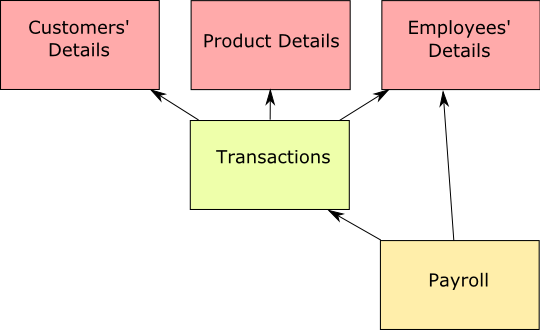
- Module import/export flow